
Imagine this. You’ve just delivered 200 custom T-shirts for a college fest, corporate event or your new streetwear brand. The graphics look fantastic, the colours are bright, and your customer is delighted.
Then, after the first wash, the WhatsApp complaints start arriving.
“Bhai, print nikal raha hai!”
The corners are lifting. Some letters are coming off. And a few T-shirts look like they’ve survived several years of washing instead of just one cycle.
Sound familiar?
DTF print peeling after wash is usually caused by inadequate heat or pressure during transfer, insufficient adhesive curing, incompatible fabric finishes, incorrect peeling technique or harsh laundering. To prevent peeling, follow your transfer supplier’s application instructions, use a properly calibrated heat press and test print adhesion before bulk production.
The good news? Most early peeling problems can be prevented once you understand what goes wrong.
Let’s decode the printing science, identify the seven most common causes and understand how to fix a failing DTF print without wasting your production budget.

1. Why Does DTF Printing Peel Off After Washing?
Before troubleshooting DTF print peeling after wash, let’s understand how Direct-to-Film (DTF) printing actually works.
Unlike traditional screen printing, DTF printing uses a special PET transfer film to carry a design onto fabric.
The process involves five main stages:
- Printing: Specialised DTF inks are deposited onto a PET film, typically with a white ink layer supporting the design.
- Powder application: Hot-melt adhesive powder is applied to the wet ink.
- Curing: The printed film is heated to melt and prepare the adhesive layer.
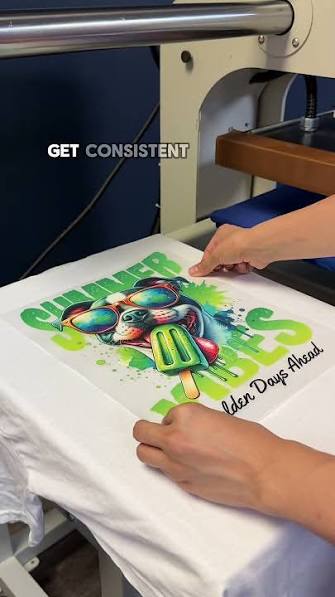
- Heat transfer: The design is pressed onto a T-shirt using controlled temperature, time and pressure.
- Film removal: The carrier film is peeled away according to the transfer’s hot-peel, warm-peel or cold-peel instructions.
When everything works correctly, the adhesive bonds the printed design to the textile surface.
But if the adhesive fails to make proper contact with the fibres, the print can gradually separate.
Why Does Washing Reveal a Weak DTF Print?
A freshly pressed DTF design may appear perfectly attached even when adhesion is incomplete.
Washing introduces several stresses:
- Water and detergent penetrate the garment.
- Agitation causes friction between fabric and print.
- Cotton fibres swell and move when wet.
- Spin cycles repeatedly bend and stretch the printed surface.
- High drying temperatures may further stress the adhesive and printed layer.
These conditions expose weaknesses that weren’t visible immediately after production.
That’s why DTF print peeling after wash should be investigated as a production-quality issue, not automatically blamed on the customer’s washing machine.
2. Seven Common Causes of DTF Print Peeling
Understanding the actual cause is more useful than blindly increasing the heat press temperature.
Here are seven problems worth checking.
Cause 1: Insufficient Heat Press Temperature
Heat activates the thermoplastic adhesive used in DTF transfers.
If the adhesive doesn’t receive sufficient heat, it may not properly flow into and grip the fabric surface.
The print might initially look fine but begin lifting during subsequent washing.
How to identify it:
- Corners lift after the first few washes.
- Sections of the design detach relatively cleanly.
- The affected area feels poorly bonded.
How to fix it:
Check the temperature recommended by your specific transfer manufacturer.
Verify the heat press’s actual platen temperature using suitable measuring equipment. A machine displaying 150°C doesn’t necessarily mean every part of the platen is delivering that temperature.
For reference, some commercial DTF suppliers recommend application conditions around 130–160°C, depending on the transfer and fabric.
However, there is no universal DTF pressing temperature. Always follow the supplier’s validated settings.
Cause 2: Incorrect Pressure or Uneven Heat Distribution
Temperature alone cannot guarantee proper adhesion.
Your heat press must also create consistent contact between the transfer and the garment.
Imagine pressing a large graphic on an oversized T-shirt while a thick seam sits underneath one side of the design.
The raised seam prevents uniform contact. As a result, one portion receives adequate pressure while another remains weakly bonded.
This can lead to DTF print peeling after wash, particularly around the edges.
How to fix it:
- Ensure the printing area lies completely flat.
- Keep thick seams, collars and zippers outside the pressing area.
- Use an appropriate pressing pillow or pad when necessary.
- Check pressure across the entire design.
- Inspect the press pad for damage or uneven compression.
Avoid assuming that maximum pressure is always better. Excessive pressure can also damage garments or interfere with some transfer applications.
Cause 3: Improper DTF Powder Curing
DTF adhesive powder plays a critical role in print durability.
Before the transfer reaches the heat press, the powder must be processed correctly during film preparation.
If curing is incomplete, the adhesive may not perform as intended.
Poor powder distribution can also leave some areas with insufficient bonding material.
Common warning signs include:
- Uneven adhesive coverage.
- Grainy or inconsistent adhesive appearance.
- Certain parts of the design repeatedly failing.
- Poor bonding despite following the heat press instructions.
How to fix it:
Check the powder manufacturer’s recommended curing conditions, film temperature and equipment settings.
If you’re outsourcing your DTF transfers, ask the supplier about powder compatibility, curing controls and batch consistency.
For a small Indian printing business purchasing ready-made DTF gang sheets, this distinction matters.
Sometimes the heat press operator is doing everything correctly, but the supplied transfer itself has a production defect.
Cause 4: Removing the PET Film at the Wrong Time
Not every DTF transfer uses the same peeling method.
Some products require hot peeling. Others require warm or completely cold peeling.
Removing the film at the wrong temperature can pull delicate parts of the design away from the garment.
This issue often appears immediately during application, but partially lifted sections may fail completely after washing.
How to fix it:
Check whether your transfer is:
- Hot peel
- Warm peel
- Cold peel
Follow the manufacturer’s instructions rather than relying on the peeling method used for another film.
If a small section starts lifting with the carrier, stop peeling and follow the supplier’s recommended recovery procedure.
Never force the film off when the artwork is visibly coming away.
Cause 5: Moisture, Fabric Finishes or Contamination
One overlooked reason for DTF print peeling after wash is the condition of the T-shirt itself.
Garments can contain residual moisture, oils, lint or chemical finishes that affect adhesive contact.
Some sportswear, jackets and performance fabrics have water-repellent or other surface treatments that make bonding more difficult.
Even ordinary cotton T-shirts may contain finishing chemicals that should be considered during transfer testing.
How to fix it:
Pre-press the T-shirt briefly when recommended to remove moisture and wrinkles.
Inspect the print area for lint, dirt and contamination.
For unfamiliar fabrics, conduct a sample transfer and wash test before committing to production.
This is especially important when printing on polyester jerseys, treated fabrics or unusual apparel blanks.
Cause 6: Washing Too Soon or Using Harsh Laundry Methods
Sometimes the application is correct, but aftercare creates problems.
Many commercial DTF suppliers advise waiting at least 24 hours before the first wash.
That waiting period is a product-specific care recommendation, not a universal chemical rule.
Harsh washing conditions can also shorten print life.
Common mistakes include:
- Washing in very hot water.
- Using bleach or aggressive cleaning products.
- Scrubbing the printed area.
- Washing with rough, heavy garments.
- Using high-temperature tumble drying.
- Ironing directly over the design.
How to prevent DTF print peeling after wash:
Turn the garment inside out, use a mild detergent and select a gentle, cool-water wash.
Air drying is generally a sensible choice, especially for printed cotton T-shirts sold in India’s hot and humid conditions.
Always follow the garment label and transfer supplier’s care instructions.
Cause 7: Incompatible Adhesive or Excessively Rigid Print Design
Not all DTF adhesive powders provide the same flexibility, bonding behaviour or fabric compatibility.
A powder suitable for a standard cotton T-shirt may not perform equally well on a highly stretchable polyester-spandex garment.
Similarly, a thick, solid print area may experience greater mechanical stress than a smaller, more flexible design.
A rigid print can crack as the fabric stretches, sometimes followed by peeling.
How to fix it:
Choose transfer materials compatible with the intended fabric.
Avoid unnecessary ink build-up and test large solid graphics on the actual garment.
For sportswear and stretch fabrics, check whether the supplier offers a suitable stretch-compatible DTF transfer system.
Remember: Cracking and peeling are related but different defects.
Cracking means the printed layer has split. Peeling means it has separated from the garment.
For a broader explanation, read our guide on why printed T-shirts crack after washing.
3. How to Identify the Cause From the Print Defect
When investigating DTF print peeling after wash, examine the pattern of damage before deciding on a remedy.
The location and timing of failure can provide useful clues.
DTF Peeling Problems: Causes and Solutions
| Visible problem | Possible cause | Recommended action |
|---|---|---|
| Print corners lifting | Insufficient pressure, heat or contact | Verify press settings and platen contact |
| Entire design detaching | Weak adhesion, incorrect cure or incompatible fabric | Test transfer and garment compatibility |
| Small letters coming off | Incorrect peel timing or inadequate contact | Check film instructions and delicate artwork |
| Print cracking when stretched | Rigid printed layer or unsuitable transfer system | Review ink load, adhesive and fabric stretch |
| One side peeling repeatedly | Uneven platen temperature or pressure | Inspect press distribution and pad condition |
| Peeling after hot washing | Excessive laundering stress or weak initial bond | Review application and wash-care instructions |
| Print sticking to carrier film | Incorrect peel timing or incomplete adhesion | Stop peeling and troubleshoot application |
These are diagnostic clues rather than definitive proof. More than one defect can produce the same visible symptom.
Five-Step DTF Print Troubleshooting Method
Follow this sequence before changing your production settings.
Step 1: Identify when the peeling started.
Did the print lift immediately after pressing, after the first wash or after several washes?
Early failure points towards an application or material problem, although laundering may also contribute.
Step 2: Examine the affected area.
Check whether the problem affects the corners, fine lettering, large solid areas or the entire design.
Step 3: Review the heat press settings.
Record actual temperature, dwell time, pressure, garment type and peel method.
Step 4: Test another garment.
Apply a fresh transfer using the manufacturer’s recommended settings on the same fabric.
If possible, compare it with a transfer from another batch.
Step 5: Conduct a controlled wash test.
Allow the recommended waiting period, wash according to the care instructions and inspect the design after drying.
Change one production variable at a time wherever possible. Otherwise, you may solve the problem without knowing which adjustment worked.
4. Can a Peeling DTF Print Be Fixed?
Here’s the question every small print-shop owner wants answered:
Can you save a T-shirt when the DTF print has already started peeling?
Sometimes, yes.
If the adhesive is still present and the print has only partially lifted, carefully repressing it may restore some adhesion.
However, repressing cannot reliably repair every failure.
How to Fix DTF Print Peeling With a Heat Press
For a small, clean edge-lifting defect, consider the following method:
- Ensure the garment is completely clean and dry.
- Position the lifted portion of the design carefully.
- Cover the print using a suitable protective sheet approved for your transfer system.
- Apply the transfer manufacturer’s recommended repressing conditions.
- Allow the garment to cool according to the instructions.
- Inspect the repair and perform a subsequent wash test.
Do not press directly onto an exposed print without appropriate protection.
Important: Avoid using a household iron as a substitute for a calibrated heat press when evaluating commercial repair quality. Household irons cannot reliably reproduce consistent temperature and pressure across a large graphic.
When Repressing Will Not Work
A peeling DTF print may be beyond reliable repair when:
- Large sections have completely detached.
- The adhesive layer is missing or contaminated.
- The printed design is badly cracked.
- The fabric has an incompatible surface finish.
- The print has suffered significant heat damage.
- Repeated washing has distorted the design.
For a personal T-shirt, a cosmetic repair may be acceptable.
But if you’re selling premium custom apparel, repairing a visibly defective print and shipping it as new is risky.
In many cases, replacing the garment is better than facing a refund, negative review or damaged customer relationship.
5. How to Prevent DTF Peeling During Production
The best solution to DTF print peeling after wash is preventing weak adhesion before garments leave your workshop.
That requires a repeatable production process.
Use the Correct DTF Heat Press Settings
Different transfer systems require different application conditions.
| Production variable | What to check | Why it matters |
|---|---|---|
| Temperature | Supplier-recommended setting and actual platen temperature | Activates the adhesive correctly |
| Pressing time | Required dwell time | Delivers sufficient heat into the transfer |
| Pressure | Recommended and evenly distributed pressure | Ensures consistent fabric contact |
| Fabric | Cotton, polyester, blends or treated materials | Affects heat response and adhesion |
| Peel method | Hot, warm or cold | Prevents damage during carrier removal |
| Finishing press | Whether required by the supplier | May improve bonding and surface finish |
| Wash test | Performance after laundering | Confirms real-world durability |
Some DTF systems use relatively low application temperatures, while others require higher settings.
Never copy a random temperature chart from the internet without confirming that it applies to your specific film, adhesive, garment and heat press.
Don’t Skip the Finishing Press When Required
Many transfer manufacturers recommend a second press after removing the carrier film.
This can help improve contact between the transfer and fabric and may produce a more consistent finish.
However, finishing time and pressure must follow the product instructions.
Excessive heat exposure is not a substitute for correct initial application.
Test the Actual Fabric Before Bulk Printing
Suppose a Bengaluru clothing brand orders 500 oversized, 240 GSM cotton T-shirts with large back graphics.
The printer has previously tested the design on a 180 GSM cotton blank.
Can the same settings simply be assumed to work?
Not necessarily.
Different garments may vary in thickness, knit structure, finishes and moisture content.
The sensible approach is to test the actual production blank, not just a similar-looking garment.
This becomes even more important when switching suppliers.
Maintain Your Heat Press
A heat press is production equipment, not just a machine that gets hot.
Periodically check:
- Temperature accuracy.
- Pressure consistency.
- Platen cleanliness.
- Condition of the lower pad.
- Smooth and level contact.
- Mechanical operation and calibration.
A poorly maintained machine can create recurring defects across hundreds of garments.
Educate Customers About Washing
Even well-applied DTF prints require appropriate care.
Include a small wash-care card with customer orders.
A simple version could say:
DTF T-Shirt Care Instructions
- Wait at least 24 hours before the first wash, unless the supplier specifies otherwise.
- Turn the garment inside out.
- Wash using cool water and mild detergent.
- Avoid bleach and vigorous scrubbing.
- Air dry wherever possible.
- Do not iron directly over the print.
For Indian print-on-demand businesses, providing clear care instructions can reduce avoidable complaints and help customers maintain their garments.
6. DTF Printing Quality Control Checklist
If you’re running a custom printing workshop or launching a T-shirt brand, quality control shouldn’t begin after someone complains.
Build it into every production batch.
Before Printing
- Confirm garment fabric composition and finish.
- Check that the transfer is suitable for the fabric.
- Inspect printed film and adhesive coverage.
- Verify transfer storage and handling conditions.
- Confirm the correct heat press application instructions.
During Heat Transfer
- Pre-press the garment if recommended.
- Position the design on a flat, clean surface.
- Verify platen temperature.
- Confirm pressing time and pressure.
- Follow the correct film-peeling procedure.
- Perform the finishing press if required.
After Printing
- Inspect edges, lettering and fine details.
- Check for incomplete transfer.
- Look for unwanted shine, scorching or distortion.
- Let the garment cool before folding when recommended.
- Set aside test samples from new material combinations.
Before Bulk Dispatch
- Complete a representative wash test.
- Check for peeling, cracking and colour changes.
- Record any production defects.
- Approve or reject the sample against agreed standards.
- Provide customer care instructions.
For larger orders, connect these checks with your garment inspection process.
Our T-shirt sample approval checklist explains the wider quality-control steps worth completing before mass production.
How Many Washes Should a DTF Print Survive?
You’ll often see suppliers advertising 40, 50 or even more wash cycles.
But there’s an important catch.
These figures depend on the transfer system, fabric, washing conditions and testing method. They are not a universal guarantee for every DTF print.
Instead of relying only on marketing claims, establish a reasonable durability requirement for your products and test representative garments against it.
Even a small workshop can develop a repeatable wash-testing procedure using consistent detergent, wash settings and inspection criteria.
7. Frequently Asked Questions About DTF Durability
Why Is My DTF Print Peeling After the First Wash?
DTF print peeling after wash, especially after the first cycle, often indicates incomplete adhesive bonding. Possible causes include insufficient pressing heat, time or pressure, improper adhesive curing, fabric incompatibility or unsuitable laundering. Review the transfer instructions and test a fresh print before changing production settings.
Can You Repress a DTF Transfer After Washing?
Yes, some partially lifted transfers can be repressed if the adhesive and printed layer remain intact. Use the supplier’s approved procedure and a protective sheet. However, repressing cannot guarantee a permanent repair, particularly when the print is cracked, contaminated or extensively detached.
Is DTF Printing Waterproof?
DTF prints are generally designed to tolerate laundering once correctly applied, but that doesn’t make the entire T-shirt waterproof. Print wash resistance depends on adhesion, materials, washing conditions and garment care.
Does DTF Printing Last Longer Than DTG?
Neither process automatically guarantees better durability. High-quality DTF and DTG prints can both perform well when the correct materials, equipment and curing methods are used.
DTF creates a transferred printed layer bonded to the fabric, whereas DTG prints ink directly onto the garment.
To understand the differences in cost and production suitability, explore our DTF vs DTG printing cost comparison for India.
Does Washing DTF T-Shirts Inside Out Prevent Peeling?
Washing inside out reduces direct friction against the printed surface and is generally good practice.
However, it cannot compensate for poor adhesive bonding during production.
Can Cheap DTF Powder Cause Peeling?
Yes. Poor-quality, incompatible, degraded or improperly processed adhesive powder can contribute to weak bonding.
But an expensive powder doesn’t automatically guarantee durability. Compatibility, curing and correct application remain essential.
Why Does My DTF Print Peel Only at the Edges?
Edge peeling can result from insufficient platen contact, uneven pressure, heat distribution problems or incomplete adhesive bonding.
Check whether raised seams, garment wrinkles or incorrect pressing conditions are affecting the design perimeter.
Final Thoughts: Good DTF Printing Is About Process, Not Luck
DTF print peeling after wash can be frustrating, especially when you’ve invested time, money and effort into producing custom apparel.
But the solution isn’t simply buying more expensive ink or increasing your heat press temperature.
A durable DTF print depends on several things working together: compatible materials, correctly cured adhesive, accurate heat press settings, suitable fabric preparation and sensible washing instructions.
For Indian custom T-shirt businesses, the real lesson is simple.
A print that looks good on the production table is not necessarily a print that will survive everyday use.
Test before scaling. Maintain your equipment. Document the settings that work. And never skip quality checks just to dispatch an order a few hours earlier.
Whether you’re printing ten T-shirts for a college event or producing 1,000 pieces for a growing streetwear label, reliable print quality is one of the easiest ways to protect customer trust.
Because in the custom apparel business, a great design gets the first sale.
A print that lasts helps earn the next one.
See Also
- DTF Transfers vs. Sublimation: Which Is Right for Your Project?
- Why Your DTF Prints Are Cracking (And How to Fix It)
- Punjabi Typography T Shirt Design Vectors: Regional Language Pride for Indian Streetwear
- Master Guide: T-Shirt Back Graphic Design Layout Placement for Indian Streetwear Brands
- The Texture Battle: Puff Print vs High Density Printing in Indian Streetwear
- DTF vs DTG Printing Cost in India: The Ultimate Reality Check for Your T-Shirt Brand
- Blinkstore vs Qikink Print on Demand India: The Inventory-Free Gateway